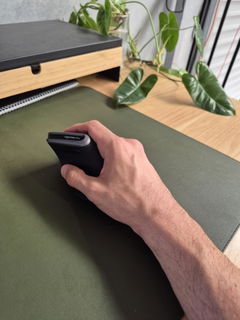
Larger vertical mouse with left and right-handed options
Does a Standard Mouse Feel Too Flat or Too Small in Your Hand?
If you spend hours using a mouse every day, both the shape and size of the device matter.
The ErgoFeel Vertical Ergonomic Mouse uses a larger, sculpted vertical body designed for medium-large to larger hands, giving your fingers and palm more surface to rest around than a compact mouse.
Choose a right-handed or left-handed model, then select either wired simplicity or wireless freedom depending on how you prefer to work.
A larger vertical mouse with something many ergonomic mice still don't offer: a true left-handed option.
Choose the version built for the hand you actually mouse with, then choose wired or wireless connectivity to suit your workstation.
Built Around Hand Position, Hand Size and Choice
VERT
Vertical Hand Position
Changes the hand and forearm position from the fully palm-down posture typically used with a conventional flat mouse.
12cm
Larger Mouse Body
The 12cm-long body is better suited to medium-large and larger hands than many compact ergonomic mice.
L / R
Left or Right Hand
Dedicated mirrored models let you choose a mouse shaped specifically for the hand you use.
W / WL
Wired or Wireless
Choose a direct wired connection or a wireless USB model depending on your desk setup and preference.
Hand Size Should Be One of the First Things You Check
Ergonomic mice are not one-size-fits-all.
A mouse that is too small may leave part of your hand unsupported or encourage a tighter grip.
A mouse that is too large may leave shorter fingers stretching for the main buttons and scroll wheel.
The ErgoFeel measures approximately 12cm long × 7cm wide × 7cm high, making it most appropriate for users who prefer a larger mouse body.
Important before you buy
This Is Not One of Our Small-Hand Mice
The ErgoFeel has a relatively substantial 12cm body.
If you have a small or petite hand, you may find the buttons and scroll wheel sit further away than is comfortable.
In that case, consider a smaller model such as the Delux Mini or Ergo Comfi rather than choosing a larger mouse and trying to adapt your grip around it.
What Changes When You Use a Vertical Mouse?
A conventional mouse generally positions your palm towards the desk.
The ErgoFeel rotates the hand into a more upright, handshake-style position while you point, click and scroll.
That changes the relationship between the wrist, forearm and desk during mouse use.
It is not a guaranteed treatment for pain or injury, but it provides a genuinely different working position from a traditional flat mouse.
Left-Handed Users Don't Have to Settle for a Right-Handed Shape
Many vertical mice are produced only for the right hand.
The ErgoFeel is available in a dedicated left-handed model, with the body shape mirrored to suit the opposite hand.
This makes it particularly useful if you naturally mouse left-handed or have deliberately moved the mouse to your left side as part of your workstation setup.
i
Switching mouse hands? Expect some coordination adjustment at first. Pointer control and clicking can feel unfamiliar until your non-dominant hand develops the movement patterns required for regular mouse use.
Choose the Version That Matches Your Workstation
Right-Handed Wired
Left-Handed Wired
Right-Handed Wireless
Left-Handed Wireless
Choose Wired If You Want the Simplest Connection
The wired model connects directly to a compatible USB port.
There are no batteries to replace and no wireless receiver to manage.
It can be a particularly practical choice for a permanent workstation where the mouse remains connected to the same computer each day.
i
Check your computer's ports and desk layout. If your computer is positioned well away from the mouse area or has USB-C ports only, make sure your setup suits a wired USB mouse before ordering.
Choose Wireless If You Want a Cable-Free Desk
The wireless version connects through a wireless USB receiver rather than Bluetooth.
This removes the cable from your immediate mouse area while retaining a straightforward USB connection to the computer.
The wireless model requires 2 × AAA batteries, which are not included.
Choosing wireless?
The Standard ErgoFeel Wireless Model Uses a USB Receiver, Not Bluetooth
Make sure your computer has a compatible USB port available for the receiver.
If your computer only provides USB-C ports, you may require a suitable adapter or hub.
If you specifically want Bluetooth connectivity or the ability to switch between multiple devices, consider the ErgoFeel Pro instead.
Straightforward Plug-and-Play Setup
The ErgoFeel is designed to operate without requiring a specialist driver installation for normal mouse use.
Connect the wired USB cable or wireless receiver to a compatible computer and use it within your normal Mac or Windows workstation.
New to vertical mice?
Give Yourself Time to Adapt to the Different Shape
A vertical mouse changes the way you grip and move the device.
Cursor control can initially feel less familiar because your hand is no longer resting in the same position used with a conventional flat mouse.
Some people adapt quickly while others prefer to introduce the mouse gradually across several work sessions.
The goal is comfortable, controlled movement, not forcing yourself to immediately use an unfamiliar device for an entire workday.
Let the Whole Arm Help Move the Mouse
Mouse movement does not need to come entirely from repeated small wrist movements.
Keep the ErgoFeel close to your body and allow some pointer movement to come from the forearm and upper arm as well.
1
Keep It Close
Place the mouse immediately beside your keyboard instead of reaching far out to the side.
2
Relax Your Grip
Rest your hand around the mouse rather than squeezing the body more firmly than necessary.
3
Use Broader Movement
Allow the forearm and shoulder to contribute to mouse movement rather than relying only on the wrist.
Your Keyboard Can Affect Mouse Reach Too
Even a well-fitted ergonomic mouse can end up too far away if a full-size keyboard pushes it further out to the side.
If you use your mouse frequently, pairing it with a compact keyboard can allow the mouse to sit much closer to your body.
This is particularly relevant for right-handed mouse users because the number pad on a conventional full-size keyboard sits directly between the main typing area and the mouse.
Mouse Tracking Can Depend on the Desk Surface
Optical mice can behave differently across glossy, reflective, transparent or unusually uniform desk surfaces.
If pointer tracking is inconsistent on your desk, use the mouse on a suitable opaque mouse pad or other compatible surface.
A Practical Choice for Everyday Computer Work
General Office Work
Administration
Home Offices
Long Mouse Sessions
Its straightforward button layout and simple connectivity make the ErgoFeel particularly well suited to everyday pointing, scrolling, spreadsheets, email, web browsing and general office applications.
Heavy CAD or specialist mouse work?
Consider How Much You Depend on the Scroll Wheel and Additional Controls
The ErgoFeel is primarily a straightforward ergonomic office mouse.
If your work relies heavily on advanced programmable controls, high-frequency middle-button use, horizontal scrolling or specialist CAD and design functions, another model may better suit your workflow.
For power users, consider comparing the ErgoFeel with the XM Precision Mouse or another specialist option in our range.
ErgoFeel or ErgoFeel Pro?
EF
Choose the Standard ErgoFeel If...
You want a straightforward larger vertical mouse, need a left-handed option, or prefer the choice between wired and wireless USB models.
PRO
Choose the ErgoFeel Pro If...
You are right-handed and want multi-device connectivity, dual Bluetooth plus wireless USB, rechargeable power and adjustable DPI settings.
Choose Your Mouse by Hand Size, Not Just Features
- Delux Mini: small right hands
- Ergo Comfi: small hands, left or right models
- Ease Vertical Mouse: medium hands
- Delux Medium X: medium right hands
- ErgoFeel: medium-large to large hands, left or right
- ErgoFeel Pro: medium-large right hands with advanced connectivity
There is no benefit in buying a feature-rich ergonomic mouse if the body is simply the wrong size for your hand.
Looking at a Vertical Mouse Because Your Wrist or Forearm Is Uncomfortable?
Changing mouse shape can change the position of the hand, wrist and forearm during computer work.
That may make mouse use feel more comfortable for some people, particularly when their existing mouse shape or size does not suit them.
However, an ergonomic mouse is not a treatment for carpal tunnel syndrome, RSI, wrist pain, tennis elbow or other musculoskeletal conditions, and symptom relief cannot be guaranteed.
Mouse position, keyboard width, desk height, workload and individual health factors can all influence symptoms.
Persistent or significant symptoms should be assessed by an appropriate health professional.
Product Details
Product Type
Vertical ergonomic mouse
Best Hand Fit
Medium-large to large hands
Handedness
Dedicated right-handed and left-handed models available
Length
Approximately 12cm
Wired Option
USB wired connection
Wireless Option
Wireless USB receiver
Wireless Batteries
2 × AAA batteries, not included
Bluetooth
No, standard wireless model uses a USB receiver
Setup
Plug and play for normal mouse functions
Compatibility
Compatible Mac and Windows computer environments
Best For
Medium-large and larger-handed users wanting a straightforward vertical mouse with left/right and wired/wireless choices
Is the ErgoFeel Vertical Ergonomic Mouse Right for You?
✓
A Strong Choice If...
You have a medium-large or larger hand, want to change from a traditional flat mouse and value the ability to choose left or right handed, wired or wireless.
!
Consider Another Mouse If...
You have a small hand, require Bluetooth or multi-device switching, want rechargeable power, or need advanced controls for specialist CAD, design or high-precision workflows.
Not Sure Which Mouse Size or Model Will Suit You?
Use the Ask a Question option on this page and tell us your hand size, which hand you mouse with, how many hours you use a mouse each day and what you dislike about your current mouse.
If you're considering a new mouse because of discomfort, include where you experience symptoms so our team can help you compare the ErgoFeel with the other ergonomic mice in our range.
✓
1-Year Warranty
The ErgoFeel Vertical Ergonomic Mouse is covered by a one-year warranty. If a fault develops during the warranty period, we'll work with you to arrange repair or replacement in accordance with our warranty terms.
A Larger Vertical Mouse with More Choice About How You Use It
If compact ergonomic mice feel too small, the ErgoFeel gives medium-large and larger hands a substantial vertical shape, with dedicated left and right-handed models and the choice of wired or wireless connectivity for a straightforward everyday workstation setup.