Designed for medium hands — left or right
When Your Wrist or Forearm Is Telling You Your Mouse Isn't Working for You
If you spend hours using a computer mouse, a traditional palm-down position can become increasingly uncomfortable — particularly when you're repeating the same movements day after day.
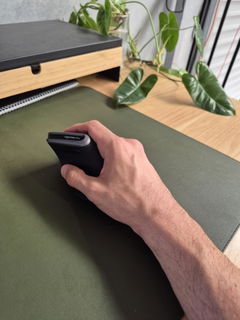
The Ease Vertical Ergonomic Mouse changes the position of your hand and forearm, supporting them in a more upright, handshake-style posture during everyday computer work.
Designed specifically for medium-sized hands and available in dedicated right- and left-handed models, Ease is a simple, wireless ergonomic mouse for people who want greater comfort without complicating their workstation.
A different hand position can make a big difference across a long working day.
Ease supports your hand in a more upright position and is shaped to reduce the amount of gripping required to move and control the mouse.
A Popular Choice When Conventional Mouse Use Has Become Uncomfortable
Ease has become one of our most established ergonomic mice, with customers commonly choosing it because of wrist, hand or forearm discomfort associated with computer work.
Customer feedback repeatedly describes the mouse as comfortable and easy to use once familiar with the vertical position.
✓
More Upright Wrist Position
The vertical shape reduces the amount your forearm needs to rotate into the palm-down position used with a conventional mouse.
✓
Designed to Reduce Grip Demand
The curved body and moulded thumb support give your hand somewhere to rest rather than requiring you to constantly squeeze the sides of the mouse.
✓
Medium-Hand Fit
Sized specifically for medium hands so the palm can remain supported while the fingers comfortably reach the controls.
✓
Wireless Everyday Use
Simple USB wireless connectivity keeps your desktop uncluttered without requiring Bluetooth setup or driver installation.
The Kind of Mouse People Come Back and Buy Again
One Ease customer originally received the mouse through their WorkCover insurer and liked it enough to later purchase another themselves.
Another customer bought the Ease for her husband because of wrist discomfort. After adapting to the vertical position, he found it comfortable enough that he no longer wanted to return to a traditional mouse.
That's a useful way to think about this product: it isn't about adding another gadget to the desk. It's about changing one of the tools you may be using continuously for hours every day.
Why Does a Vertical Mouse Feel Different?
Place your hand flat on your desk with your palm facing down. That's approximately the position a traditional mouse asks you to maintain.
Now turn your hand onto its side as though you're shaking someone's hand.
Ease is designed around that more upright position.
Instead of rotating your forearm fully towards the desk, your wrist and forearm remain in a more neutral orientation while you click, scroll and move the cursor.
Support the Hand Instead of Squeezing the Mouse
Mouse discomfort isn't only about wrist angle. How tightly you hold the mouse can matter as well.
Ease uses a contoured body with a moulded thumb support so your hand can rest against the mouse while you work.
Rather than holding the mouse in a constant pinch grip, aim to keep your hand relaxed and let the shape of the mouse provide support.
✓
Relax your grip. An ergonomic mouse works best when you allow your hand to rest on it rather than tightly squeezing it throughout the day.
Designed for Medium Hands
Ergonomic mice are not one-size-fits-all.
The Ease measures approximately 11.5cm long × 5.7cm wide × 8.7cm high and sits within the medium-hand category of our ergonomic mouse range.
Correct sizing helps your palm remain supported while keeping the buttons and scroll wheel within comfortable reach of your fingers.
If your hand is distinctly smaller or larger, another mouse in our range may provide a better fit.
Available for Both Left- and Right-Handed Users
Ease isn't a symmetrical mouse that simply asks left-handed users to make do.
Choose the dedicated model designed for the hand you actually mouse with.
R
Right-Handed Model
Contoured specifically to support a medium-sized right hand in the vertical position.
L
Left-Handed Model
A dedicated mirrored design for medium-sized left hands rather than a compromised one-shape-fits-both solution.
Particularly Well Suited To
Medium Hands
Left or Right-Hand Users
Long-Hour Computer Work
Wrist & Forearm Discomfort
The Ease is a particularly practical choice for office and home-office users who want to change their mouse posture without moving to a more specialised pointing device.
Never Used a Vertical Mouse Before?
It will feel different at first — because it's supposed to.
Your hand is sitting at a different angle and the movement pattern you've developed over years of conventional mouse use needs a little time to adapt.
Encouragingly, one Ease customer reported needing only around half a day to become comfortable with the new hand position.
i
Give yourself some time. Don't judge a vertical mouse solely on the first few minutes. Use it for normal work and allow the new movement to become familiar.
Using an Ergonomic Mouse Because You're Already in Pain?
Ease is frequently selected by people experiencing discomfort through the wrist, hand or forearm during computer work.
Its vertical shape may also be useful as part of a workstation strategy for people managing conditions where conventional mouse positioning or gripping aggravates symptoms.
Simple Wireless USB — No Complicated Setup
Ease connects using the supplied wireless USB receiver.
There are no drivers to download and no Bluetooth pairing process to work through. Simply insert the receiver into a compatible USB port, turn the mouse on and begin using it.
!
Can't find the USB receiver? Check the underside of the mouse. The receiver is stored neatly inside the mouse for transport and needs to be removed before first use.
Powered by Replaceable AAA Batteries
The Ease uses 2 × AAA batteries, so there is no charging cable or recharge cycle to manage.
When the batteries eventually run low, simply replace them and continue working.
Batteries are not included, so have two AAA batteries available when setting up the mouse for the first time.
Get More from Your Ergonomic Mouse
The mouse itself is only one part of your workstation. How you position it also influences how your arm and shoulder work.
1
Keep It Close
Position the mouse immediately beside your keyboard so you don't repeatedly reach your arm away from your body.
2
Let Your Hand Rest
Place your hand naturally around the contoured body rather than tightly gripping the mouse.
3
Move More Than Your Wrist
For larger cursor movements, guide the mouse with your forearm and shoulder rather than repeatedly pivoting only from the wrist.
Simple Ergonomics Without Unnecessary Complexity
- Vertical ergonomic hand position
- Designed for medium hands
- Dedicated left-handed model available
- Dedicated right-handed model available
- Moulded thumb support
- Wireless USB connection
- Plug-and-play setup
- No driver installation required
Product Details
Mouse Style
Vertical ergonomic mouse
Hand Options
Dedicated left-handed or right-handed models
Connection
Wireless USB receiver
Setup
Plug-and-play — no driver installation required
Compatibility
Compatible with supported Windows and Mac computers
Power
2 × AAA batteries — not included
USB Receiver Storage
Receiver stores inside the underside of the mouse
Choosing Between Our Vertical Mice?
Hand size is one of the easiest ways to narrow down the right model.
- Small hand — consider a smaller vertical mouse
- Medium hand — Ease is designed specifically for this fit
- Large hand — consider a larger ergonomic mouse
- Left-handed — select the dedicated Ease left-hand model
?
Not sure about your hand size? Use the Ask a Question option on this page and tell our team your hand measurements, which hand you mouse with and any discomfort you're currently experiencing.
✓
1-Year Full Replacement Warranty
The Ease Vertical Ergonomic Mouse is backed by a one-year full replacement warranty. If your mouse develops a fault within the warranty period, we'll replace it in accordance with our warranty terms.
A Simple Change to the Tool Your Hand Uses All Day
If conventional mouse use is leaving your wrist, hand or forearm tired or uncomfortable, the Ease gives medium-handed users a straightforward way to change their working position — with dedicated left- and right-handed designs, wireless convenience and a shape made to support a more relaxed grip.